
神经搜索教程
默认情况下,OpenSearch 使用 Okapi BM25 算法计算文档评分。BM25 是一种基于关键词的算法,在包含关键词的查询上表现良好,但无法捕捉查询词的语义。与基于关键词的搜索不同,语义搜索(semantic search)会考虑查询在搜索上下文中的含义。因此,当查询需要自然语言理解时,语义搜索的表现会很好。
在本教程中,你将学习如何使用神经搜索(Neural Search)来:
- 在 OpenSearch 中实现语义搜索。
- 通过结合语义搜索和关键词搜索(keyword search)来实现混合搜索(Hybrid Search),从而提高搜索相关性(search relevance)。
术语
在开始本教程之前,了解以下术语会很有帮助:
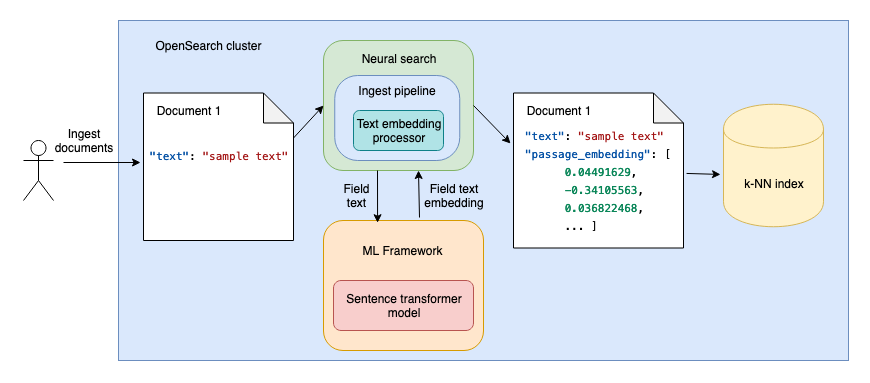
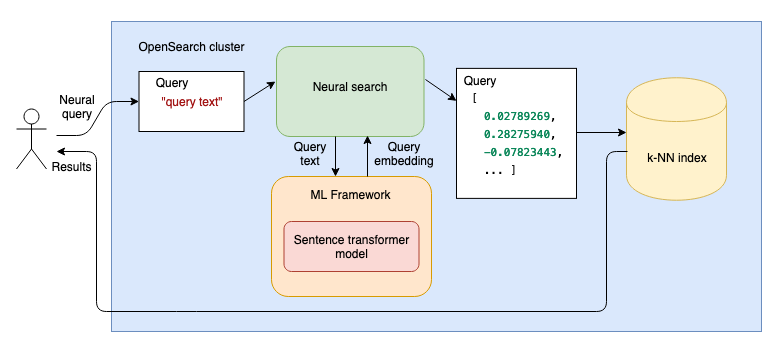
神经搜索:在摄取时和搜索时支持向量搜索:
- 在摄取时,神经搜索使用语言模型从文档的文本字段生成向量嵌入(embedding)。随后,同时包含原始文本字段及该字段向量嵌入的文档会被索引到 k-NN 索引中,如下图所示。
- 在搜索时,当你使用 neural 查询 时,查询文本会经过语言模型处理,得到的向量嵌入会与文档文本的向量嵌入进行比较,以找出最相关的结果,如下图所示。
语义搜索:利用神经搜索来确定用户查询在搜索上下文中的意图,从而提高搜索相关性。
混合搜索:结合语义搜索和关键词搜索来提高搜索相关性。
用于语义搜索的 OpenSearch 组件
在本教程中,你将使用以下 OpenSearch 组件来实现语义搜索:
在学习本教程的过程中,你会看到对所有这些组件的说明,所以即使对其中一些组件不熟悉也不必担心。上面列表中的每个链接都会带你前往相应组件的文档章节。
先决条件
在这个简单的设置中,你将使用 OpenSearch 提供的机器学习(ML)模型,以及一个没有专用 ML 节点的集群。为确保这个基本的本地设置能够正常工作,请发送以下请求来更新与 ML 相关的集群设置:
PUT _cluster/settings
{
  "persistent": {
    "plugins": {
      "ml_commons": {
        "only_run_on_ml_node": "false",
        "model_access_control_enabled": "true",
        "native_memory_threshold": "99"
      }
    }
  }
}
进阶
对于自定义本地模型的设置,请注意以下要求:
- 要注册自定义本地模型,需要额外指定
"allow_registering_model_via_url": "true"集群设置。 - 在生产环境中,最佳实践是通过设置专用 ML 节点来隔离工作负载。在具有专用 ML 节点的集群上,请指定
"only_run_on_ml_node": "true"以提高性能。
有关 ML 相关集群设置的更多信息,请参阅 ML Commons 集群设置。
教程概览
本教程包括以下步骤:
教程中的某些步骤包含可选的 Test it(测试一下)部分。你可以运行这些部分中的请求,来确认该步骤是否成功。
完成后,请按照清理部分中的步骤删除所有已创建的组件。
教程
你可以使用命令行或 OpenSearch Dashboards 的开发工具控制台来学习本教程。
第 1 步:设置 ML 语言模型
无论是在摄取时还是查询时,神经搜索都需要一个语言模型来从文本字段生成向量嵌入。
第 1(a) 步:选择语言模型
在本教程中,你将使用 Hugging Face 的 DistilBERT 模型。它是 OpenSearch 中可用的预训练句子转换器(sentence transformer)模型之一,在基准测试中取得了名列前茅的结果(详情请参阅这篇博客文章)。注册该模型时需要用到它的名称、版本和维度。你可以在预训练模型表中,通过选择与该模型 TorchScript 制品对应的 config_url 链接找到这些信息:
- 模型名称为
huggingface/sentence-transformers/msmarco-distilbert-base-tas-b。 - 模型版本为
1.0.1。 - 该模型的维度数为
768。
重要
请记下该模型的维度,因为在设置 k-NN 索引时会用到它。
进阶:使用其他模型
此外,你也可以为模型选择以下选项之一:
使用 OpenSearch 提供的任何其他预训练模型。有关更多信息,请参阅 OpenSearch 提供的预训练模型。
将你自己的模型上传到 OpenSearch。有关更多信息,请参阅自定义本地模型。
连接到托管在外部平台上的基础模型。有关更多信息,请参阅连接到远程模型。
有关如何选择模型的信息,请参阅延伸阅读。
第 1(b) 步:注册模型组
为了进行访问控制,模型被组织到模型组(model group)中(即某个特定模型各个版本的集合)。集群中的每个模型组名称都必须全局唯一。注册模型组可以确保模型组名称的唯一性。
提示
如果你在未事先注册模型组的情况下注册某个模型的第一个版本,系统会自动创建一个新的模型组。有关更多信息,请参阅模型访问控制。
要注册一个访问模式设置为 public 的模型组,请发送以下请求:
POST /_plugins/_ml/model_groups/_register
{
  "name": "NLP_model_group",
  "description": "A model group for NLP models",
  "access_mode": "public"
}
OpenSearch 会返回模型组 ID:
{
  "model_group_id": "Z1eQf4oB5Vm0Tdw8EIP2",
  "status": "CREATED"
}
你将使用此 ID 把所选模型注册到该模型组。
测试一下
在请求中提供模型组 ID,搜索新创建的模型组:
POST /_plugins/_ml/model_groups/_search
{
  "query": {
    "match": {
      "_id": "Z1eQf4oB5Vm0Tdw8EIP2"
    }
  }
}
响应中包含该模型组:
{
  "took": 0,
  "timed_out": false,
  "_shards": {
    "total": 1,
    "successful": 1,
    "skipped": 0,
    "failed": 0
  },
  "hits": {
    "total": {
      "value": 1,
      "relation": "eq"
    },
    "max_score": 1,
    "hits": [
      {
        "_index": ".plugins-ml-model-group",
        "_id": "Z1eQf4oB5Vm0Tdw8EIP2",
        "_version": 1,
        "_seq_no": 14,
        "_primary_term": 2,
        "_score": 1,
        "_source": {
          "created_time": 1694357262582,
          "access": "public",
          "latest_version": 0,
          "last_updated_time": 1694357262582,
          "name": "NLP_model_group",
          "description": "A model group for NLP models"
        }
      }
    ]
  }
}
第 1(c) 步:将模型注册到模型组
要将模型注册到模型组,请在注册请求中提供模型组 ID:
POST /_plugins/_ml/models/_register
{
  "name": "huggingface/sentence-transformers/msmarco-distilbert-base-tas-b",
  "version": "1.0.1",
  "model_group_id": "Z1eQf4oB5Vm0Tdw8EIP2",
  "model_format": "TORCH_SCRIPT"
}
注册模型是一项异步任务。OpenSearch 会返回该任务的任务 ID:
{
  "task_id": "aFeif4oB5Vm0Tdw8yoN7",
  "status": "CREATED"
}
OpenSearch 会从 URL 下载模型的配置文件和模型内容。由于该模型大于 10 MB,OpenSearch 会将其拆分为最大 10 MB 的块,并将这些块保存在模型索引中。你可以使用 Tasks API 检查任务状态:
GET /_plugins/_ml/tasks/aFeif4oB5Vm0Tdw8yoN7任务完成后,任务状态将变为 COMPLETED,Tasks API 的响应中会包含已注册模型的模型 ID:
{
  "model_id": "aVeif4oB5Vm0Tdw8zYO2",
  "task_type": "REGISTER_MODEL",
  "function_name": "TEXT_EMBEDDING",
  "state": "COMPLETED",
  "worker_node": [
    "4p6FVOmJRtu3wehDD74hzQ"
  ],
  "create_time": 1694358489722,
  "last_update_time": 1694358499139,
  "is_async": true
}
在后续的几个步骤中使用该模型时,你都需要用到这个模型 ID。
测试一下
在请求中提供模型 ID,搜索新创建的模型:
GET /_plugins/_ml/models/aVeif4oB5Vm0Tdw8zYO2响应中包含该模型:
{
  "name": "huggingface/sentence-transformers/msmarco-distilbert-base-tas-b",
  "model_group_id": "Z1eQf4oB5Vm0Tdw8EIP2",
  "algorithm": "TEXT_EMBEDDING",
  "model_version": "1",
  "model_format": "TORCH_SCRIPT",
  "model_state": "REGISTERED",
  "model_content_size_in_bytes": 266352827,
  "model_content_hash_value": "acdc81b652b83121f914c5912ae27c0fca8fabf270e6f191ace6979a19830413",
  "model_config": {
    "model_type": "distilbert",
    "embedding_dimension": 768,
    "framework_type": "SENTENCE_TRANSFORMERS",
    "all_config": """{"_name_or_path":"old_models/msmarco-distilbert-base-tas-b/0_Transformer","activation":"gelu","architectures":["DistilBertModel"],"attention_dropout":0.1,"dim":768,"dropout":0.1,"hidden_dim":3072,"initializer_range":0.02,"max_position_embeddings":512,"model_type":"distilbert","n_heads":12,"n_layers":6,"pad_token_id":0,"qa_dropout":0.1,"seq_classif_dropout":0.2,"sinusoidal_pos_embds":false,"tie_weights_":true,"transformers_version":"4.7.0","vocab_size":30522}"""
  },
  "created_time": 1694482261832,
  "last_updated_time": 1694482324282,
  "last_registered_time": 1694482270216,
  "last_deployed_time": 1694482324282,
  "total_chunks": 27,
  "planning_worker_node_count": 1,
  "current_worker_node_count": 1,
  "planning_worker_nodes": [
    "4p6FVOmJRtu3wehDD74hzQ"
  ],
  "deploy_to_all_nodes": true
}
响应中包含模型信息。可以看到 model_state 为 REGISTERED。此外,如 total_chunks 字段所示,该模型被拆分成了 27 个块。
进阶:注册自定义模型
要注册自定义模型,必须在注册请求中提供模型配置。例如,以下注册请求包含本教程所用模型的完整格式:
POST /_plugins/_ml/models/_register
{
	"name": "sentence-transformers/msmarco-distilbert-base-tas-b",
	"version": "1.0.1",
	"description": "This is a port of the DistilBert TAS-B Model to sentence-transformers model: It maps sentences & paragraphs to a 768 dimensional dense vector space and is optimized for the task of semantic search.",
	"model_task_type": "TEXT_EMBEDDING",
	"model_format": "ONNX",
	"model_content_size_in_bytes": 266291330,
	"model_content_hash_value": "a3c916f24239fbe32c43be6b24043123d49cd2c41b312fc2b29f2fc65e3c424c",
	"model_config": {
		"model_type": "distilbert",
		"embedding_dimension": 768,
		"framework_type": "huggingface_transformers",
		"pooling_mode": "CLS",
		"normalize_result": false,
		"all_config": "{\"_name_or_path\":\"old_models/msmarco-distilbert-base-tas-b/0_Transformer\",\"activation\":\"gelu\",\"architectures\":[\"DistilBertModel\"],\"attention_dropout\":0.1,\"dim\":768,\"dropout\":0.1,\"hidden_dim\":3072,\"initializer_range\":0.02,\"max_position_embeddings\":512,\"model_type\":\"distilbert\",\"n_heads\":12,\"n_layers\":6,\"pad_token_id\":0,\"qa_dropout\":0.1,\"seq_classif_dropout\":0.2,\"sinusoidal_pos_embds\":false,\"tie_weights_\":true,\"transformers_version\":\"4.7.0\",\"vocab_size\":30522}"
	},
	"created_time": 1676074079195,
  "model_group_id": "Z1eQf4oB5Vm0Tdw8EIP2",
	"url": "https://artifacts.opensearch.org/models/ml-models/huggingface/sentence-transformers/msmarco-distilbert-base-tas-b/1.0.1/onnx/sentence-transformers_msmarco-distilbert-base-tas-b-1.0.1-onnx.zip"
}有关更多信息,请参阅在 OpenSearch 中使用 ML 模型。
第 1(d) 步:部署模型
模型注册后会保存在模型索引中。接下来,你需要部署该模型。部署模型会创建一个模型实例,并将模型缓存在内存中。要部署模型,请将其模型 ID 提供给 _deploy 端点:
POST /_plugins/_ml/models/aVeif4oB5Vm0Tdw8zYO2/_deploy与注册操作一样,部署操作也是异步的,因此你会在响应中得到一个任务 ID:
{
  "task_id": "ale6f4oB5Vm0Tdw8NINO",
  "status": "CREATED"
}
你可以使用 Tasks API 检查任务状态:
GET /_plugins/_ml/tasks/ale6f4oB5Vm0Tdw8NINO任务完成后,任务状态将变为 COMPLETED:
{
  "model_id": "aVeif4oB5Vm0Tdw8zYO2",
  "task_type": "DEPLOY_MODEL",
  "function_name": "TEXT_EMBEDDING",
  "state": "COMPLETED",
  "worker_node": [
    "4p6FVOmJRtu3wehDD74hzQ"
  ],
  "create_time": 1694360024141,
  "last_update_time": 1694360027940,
  "is_async": true
}
测试一下
在请求中提供模型 ID,搜索已部署的模型:
GET /_plugins/_ml/models/aVeif4oB5Vm0Tdw8zYO2响应显示模型状态为 DEPLOYED:
{
  "name": "huggingface/sentence-transformers/msmarco-distilbert-base-tas-b",
  "model_group_id": "Z1eQf4oB5Vm0Tdw8EIP2",
  "algorithm": "TEXT_EMBEDDING",
  "model_version": "1",
  "model_format": "TORCH_SCRIPT",
  "model_state": "DEPLOYED",
  "model_content_size_in_bytes": 266352827,
  "model_content_hash_value": "acdc81b652b83121f914c5912ae27c0fca8fabf270e6f191ace6979a19830413",
  "model_config": {
    "model_type": "distilbert",
    "embedding_dimension": 768,
    "framework_type": "SENTENCE_TRANSFORMERS",
    "all_config": """{"_name_or_path":"old_models/msmarco-distilbert-base-tas-b/0_Transformer","activation":"gelu","architectures":["DistilBertModel"],"attention_dropout":0.1,"dim":768,"dropout":0.1,"hidden_dim":3072,"initializer_range":0.02,"max_position_embeddings":512,"model_type":"distilbert","n_heads":12,"n_layers":6,"pad_token_id":0,"qa_dropout":0.1,"seq_classif_dropout":0.2,"sinusoidal_pos_embds":false,"tie_weights_":true,"transformers_version":"4.7.0","vocab_size":30522}"""
  },
  "created_time": 1694482261832,
  "last_updated_time": 1694482324282,
  "last_registered_time": 1694482270216,
  "last_deployed_time": 1694482324282,
  "total_chunks": 27,
  "planning_worker_node_count": 1,
  "current_worker_node_count": 1,
  "planning_worker_nodes": [
    "4p6FVOmJRtu3wehDD74hzQ"
  ],
  "deploy_to_all_nodes": true
}
你还可以发送 Models Profile API 请求,获取集群中所有已部署模型的统计信息:
GET /_plugins/_ml/profile/models第 2 步:使用神经搜索摄取数据
神经搜索使用语言模型将文本转换为向量嵌入。在摄取期间,神经搜索会为请求中的文本字段创建向量嵌入。在搜索期间,你可以使用同一个模型为查询文本生成向量嵌入,从而对文档执行向量相似度搜索。
第 2(a) 步:为神经搜索创建摄取管道
模型部署完成后,就可以使用该模型来配置神经搜索了。首先,你需要创建一个摄取管道(Ingest Pipeline),其中包含一个处理器(Processor):处理器是在文档被摄取到索引之前对文档字段进行转换的任务。对于神经搜索,你将设置一个 text_embedding 处理器,用于从文本创建向量嵌入。你需要上一节中设置的模型的 model_id,以及一个 field_map,它指定从哪个字段获取文本(text),以及将嵌入记录到哪个字段(passage_embedding):
PUT /_ingest/pipeline/nlp-ingest-pipeline
{
  "description": "An NLP ingest pipeline",
  "processors": [
    {
      "text_embedding": {
        "model_id": "aVeif4oB5Vm0Tdw8zYO2",
        "field_map": {
          "text": "passage_embedding"
        }
      }
    }
  ]
}
测试一下
使用 Ingest API 搜索已创建的摄取管道:
GET /_ingest/pipeline响应中包含该摄取管道:
{
  "nlp-ingest-pipeline": {
    "description": "An NLP ingest pipeline",
    "processors": [
      {
        "text_embedding": {
          "model_id": "aVeif4oB5Vm0Tdw8zYO2",
          "field_map": {
            "text": "passage_embedding"
          }
        }
      }
    ]
  }
}
第 2(b) 步:创建 k-NN 索引
现在,你将创建一个 k-NN 索引,其中包含一个名为 text 的字段(存放图像描述),以及一个名为 passage_embedding 的 knn_vector 字段(存放文本的向量嵌入)。此外,将默认摄取管道设置为上一步创建的 nlp-ingest-pipeline:
PUT /my-nlp-index
{
  "settings": {
    "index.knn": true,
    "default_pipeline": "nlp-ingest-pipeline"
  },
  "mappings": {
    "properties": {
      "id": {
        "type": "text"
      },
      "passage_embedding": {
        "type": "knn_vector",
        "dimension": 768,
        "method": {
          "engine": "lucene",
          "space_type": "l2",
          "name": "hnsw",
          "parameters": {}
        }
      },
      "text": {
        "type": "text"
      }
    }
  }
}
设置好 k-NN 索引后,你就可以在之后对 passage_embedding 字段执行向量搜索。
测试一下
使用以下请求获取已创建索引的设置和映射:
GET /my-nlp-index/_settingsGET /my-nlp-index/_mappings第 2(c) 步:将文档摄取到索引中
在这一步中,你将把几个示例文档摄取到索引中。示例数据取自 Flickr 图像数据集。每个文档都包含一个对应图像描述的 text 字段,以及一个对应图像 ID 的 id 字段:
PUT /my-nlp-index/_doc/1
{
  "text": "A West Virginia university women 's basketball team , officials , and a small gathering of fans are in a West Virginia arena .",
  "id": "4319130149.jpg"
}PUT /my-nlp-index/_doc/2
{
"text": "A wild animal races across an uncut field with a minimal amount of trees .",
"id": "1775029934.jpg"
}PUT /my-nlp-index/_doc/3
{
"text": "People line the stands which advertise Freemont 's orthopedics , a cowboy rides a light brown bucking bronco .",
"id": "2664027527.jpg"
}PUT /my-nlp-index/_doc/4
{
"text": "A man who is riding a wild horse in the rodeo is very near to falling off .",
"id": "4427058951.jpg"
}PUT /my-nlp-index/_doc/5
{
"text": "A rodeo cowboy , wearing a cowboy hat , is being thrown off of a wild white horse .",
"id": "2691147709.jpg"
}当文档被摄取到索引中时,text_embedding 处理器会创建一个包含向量嵌入的附加字段,并将该字段添加到文档中。要查看已索引的示例文档,请搜索文档 1:
GET /my-nlp-index/_doc/1响应中包括文档的 _source,其中包含原始的 text 和 id 字段以及新增的 passage_embedding 字段:
{
  "_index": "my-nlp-index",
  "_id": "1",
  "_version": 1,
  "_seq_no": 0,
  "_primary_term": 1,
  "found": true,
  "_source": {
    "passage_embedding": [
      0.04491629,
      -0.34105563,
      0.036822468,
      -0.14139028,
      ...
    ],
    "text": "A West Virginia university women 's basketball team , officials , and a small gathering of fans are in a West Virginia arena .",
    "id": "4319130149.jpg"
  }
}
第 3 步:搜索数据
现在,你将分别使用关键词搜索、神经搜索以及两者的组合来搜索索引。
使用关键词搜索进行搜索
要使用关键词搜索,请使用 match 查询。你将从结果中排除嵌入:
GET /my-nlp-index/_search
{
  "_source": {
    "excludes": [
      "passage_embedding"
    ]
  },
  "query": {
    "match": {
      "text": {
        "query": "wild west"
      }
    }
  }
}
文档 3 没有被返回,因为它不包含指定的关键词。由于没有考虑语义,包含 rodeo 和 cowboy 这些词的文档评分较低:
结果
{
  "took": 647,
  "timed_out": false,
  "_shards": {
    "total": 1,
    "successful": 1,
    "skipped": 0,
    "failed": 0
  },
  "hits": {
    "total": {
      "value": 4,
      "relation": "eq"
    },
    "max_score": 1.7878418,
    "hits": [
      {
        "_index": "my-nlp-index",
        "_id": "1",
        "_score": 1.7878418,
        "_source": {
          "text": "A West Virginia university women 's basketball team , officials , and a small gathering of fans are in a West Virginia arena .",
          "id": "4319130149.jpg"
        }
      },
      {
        "_index": "my-nlp-index",
        "_id": "2",
        "_score": 0.58093566,
        "_source": {
          "text": "A wild animal races across an uncut field with a minimal amount of trees .",
          "id": "1775029934.jpg"
        }
      },
      {
        "_index": "my-nlp-index",
        "_id": "5",
        "_score": 0.55228686,
        "_source": {
          "text": "A rodeo cowboy , wearing a cowboy hat , is being thrown off of a wild white horse .",
          "id": "2691147709.jpg"
        }
      },
      {
        "_index": "my-nlp-index",
        "_id": "4",
        "_score": 0.53899646,
        "_source": {
          "text": "A man who is riding a wild horse in the rodeo is very near to falling off .",
          "id": "4427058951.jpg"
        }
      }
    ]
  }
}
使用神经搜索进行搜索
要使用神经搜索,请使用 neural 查询,并提供之前设置的模型的模型 ID,以便使用摄取时所用的同一模型为查询文本生成向量嵌入:
GET /my-nlp-index/_search
{
  "_source": {
    "excludes": [
      "passage_embedding"
    ]
  },
  "query": {
    "neural": {
      "passage_embedding": {
        "query_text": "wild west",
        "model_id": "aVeif4oB5Vm0Tdw8zYO2",
        "k": 5
      }
    }
  }
}
这一次,响应不仅包含全部五个文档,而且由于神经搜索考虑了语义,文档的排列顺序也更合理了:
结果
{
  "took": 25,
  "timed_out": false,
  "_shards": {
    "total": 1,
    "successful": 1,
    "skipped": 0,
    "failed": 0
  },
  "hits": {
    "total": {
      "value": 5,
      "relation": "eq"
    },
    "max_score": 0.01585195,
    "hits": [
      {
        "_index": "my-nlp-index",
        "_id": "4",
        "_score": 0.01585195,
        "_source": {
          "text": "A man who is riding a wild horse in the rodeo is very near to falling off .",
          "id": "4427058951.jpg"
        }
      },
      {
        "_index": "my-nlp-index",
        "_id": "2",
        "_score": 0.015748845,
        "_source": {
          "text": "A wild animal races across an uncut field with a minimal amount of trees.",
          "id": "1775029934.jpg"
        }
      },
      {
        "_index": "my-nlp-index",
        "_id": "5",
        "_score": 0.015177963,
        "_source": {
          "text": "A rodeo cowboy , wearing a cowboy hat , is being thrown off of a wild white horse .",
          "id": "2691147709.jpg"
        }
      },
      {
        "_index": "my-nlp-index",
        "_id": "1",
        "_score": 0.013272902,
        "_source": {
          "text": "A West Virginia university women 's basketball team , officials , and a small gathering of fans are in a West Virginia arena .",
          "id": "4319130149.jpg"
        }
      },
      {
        "_index": "my-nlp-index",
        "_id": "3",
        "_score": 0.011347735,
        "_source": {
          "text": "People line the stands which advertise Freemont 's orthopedics , a cowboy rides a light brown bucking bronco .",
          "id": "2664027527.jpg"
        }
      }
    ]
  }
}
使用混合搜索进行搜索
混合搜索结合了关键词搜索和神经搜索来提高搜索相关性。要实现混合搜索,你需要设置一个在搜索时运行的搜索管道(Search Pipeline)。你将配置的搜索管道会在中间阶段拦截搜索结果,并对其应用 normalization-processor。normalization-processor 会对来自多个查询子句的文档评分进行归一化和组合,并根据所选的归一化方法(normalization technique)和组合方法(combination technique)对文档重新评分。
第 1 步:配置搜索管道
要配置包含 normalization-processor 的搜索管道,请使用以下请求。处理器中的归一化方法设置为 min_max,组合方法设置为 arithmetic_mean。weights 数组以小数形式的百分比指定分配给每个查询子句的权重:
PUT /_search/pipeline/nlp-search-pipeline
{
  "description": "Post processor for hybrid search",
  "phase_results_processors": [
    {
      "normalization-processor": {
        "normalization": {
          "technique": "min_max"
        },
        "combination": {
          "technique": "arithmetic_mean",
          "parameters": {
            "weights": [
              0.3,
              0.7
            ]
          }
        }
      }
    }
  ]
}
第 2 步:使用 hybrid 查询进行搜索
你将使用 hybrid 查询来组合 match 和 neural 查询子句。请务必在查询参数中将之前创建的 nlp-search-pipeline 应用于该请求:
GET /my-nlp-index/_search?search_pipeline=nlp-search-pipeline
{
  "_source": {
    "exclude": [
      "passage_embedding"
    ]
  },
  "query": {
    "hybrid": {
      "queries": [
        {
          "match": {
            "text": {
              "query": "cowboy rodeo bronco"
            }
          }
        },
        {
          "neural": {
            "passage_embedding": {
              "query_text": "wild west",
              "model_id": "aVeif4oB5Vm0Tdw8zYO2",
              "k": 5
            }
          }
        }
      ]
    }
  }
}
OpenSearch 不仅返回了与 wild west 语义相匹配的文档,而且包含与狂野西部主题相关词语的文档,其评分也比其他文档更高:
结果
{
  "took": 27,
  "timed_out": false,
  "_shards": {
    "total": 1,
    "successful": 1,
    "skipped": 0,
    "failed": 0
  },
  "hits": {
    "total": {
      "value": 5,
      "relation": "eq"
    },
    "max_score": 0.86481035,
    "hits": [
      {
        "_index": "my-nlp-index",
        "_id": "5",
        "_score": 0.86481035,
        "_source": {
          "text": "A rodeo cowboy , wearing a cowboy hat , is being thrown off of a wild white horse .",
          "id": "2691147709.jpg"
        }
      },
      {
        "_index": "my-nlp-index",
        "_id": "4",
        "_score": 0.7003,
        "_source": {
          "text": "A man who is riding a wild horse in the rodeo is very near to falling off .",
          "id": "4427058951.jpg"
        }
      },
      {
        "_index": "my-nlp-index",
        "_id": "2",
        "_score": 0.6839765,
        "_source": {
          "text": "A wild animal races across an uncut field with a minimal amount of trees.",
          "id": "1775029934.jpg"
        }
      },
      {
        "_index": "my-nlp-index",
        "_id": "3",
        "_score": 0.3007,
        "_source": {
          "text": "People line the stands which advertise Freemont 's orthopedics , a cowboy rides a light brown bucking bronco .",
          "id": "2664027527.jpg"
        }
      },
      {
        "_index": "my-nlp-index",
        "_id": "1",
        "_score": 0.29919013,
        "_source": {
          "text": "A West Virginia university women 's basketball team , officials , and a small gathering of fans are in a West Virginia arena .",
          "id": "4319130149.jpg"
        }
      }
    ]
  }
}
你可以按如下方式将其设置为索引的默认搜索管道,而不必在每个请求中都指定搜索管道:
PUT /my-nlp-index/_settings
{
  "index.search.default_pipeline" : "nlp-search-pipeline"
}
现在你可以尝试不同的权重、归一化方法和组合方法。有关更多信息,请参阅 normalization-processor 和 hybrid 查询文档。
进阶
你可以使用搜索模板对搜索进行参数化。搜索模板会隐藏实现细节,减少嵌套层级,从而降低查询的复杂度。有关更多信息,请参阅搜索模板。
清理
完成后,从集群中删除你在本教程中创建的组件:
DELETE /my-nlp-indexDELETE /_search/pipeline/nlp-search-pipelineDELETE /_ingest/pipeline/nlp-ingest-pipelinePOST /_plugins/_ml/models/aVeif4oB5Vm0Tdw8zYO2/_undeployDELETE /_plugins/_ml/models/aVeif4oB5Vm0Tdw8zYO2DELETE /_plugins/_ml/model_groups/Z1eQf4oB5Vm0Tdw8EIP2延伸阅读
- 在 Building a semantic search engine in OpenSearch 中了解 OpenSearch 语义搜索的基础知识。
- 在 The ABCs of semantic search in OpenSearch: Architectures, benchmarks, and combination strategies 中了解结合关键词搜索与神经搜索的好处、归一化和组合方法的可选项以及基准测试。